
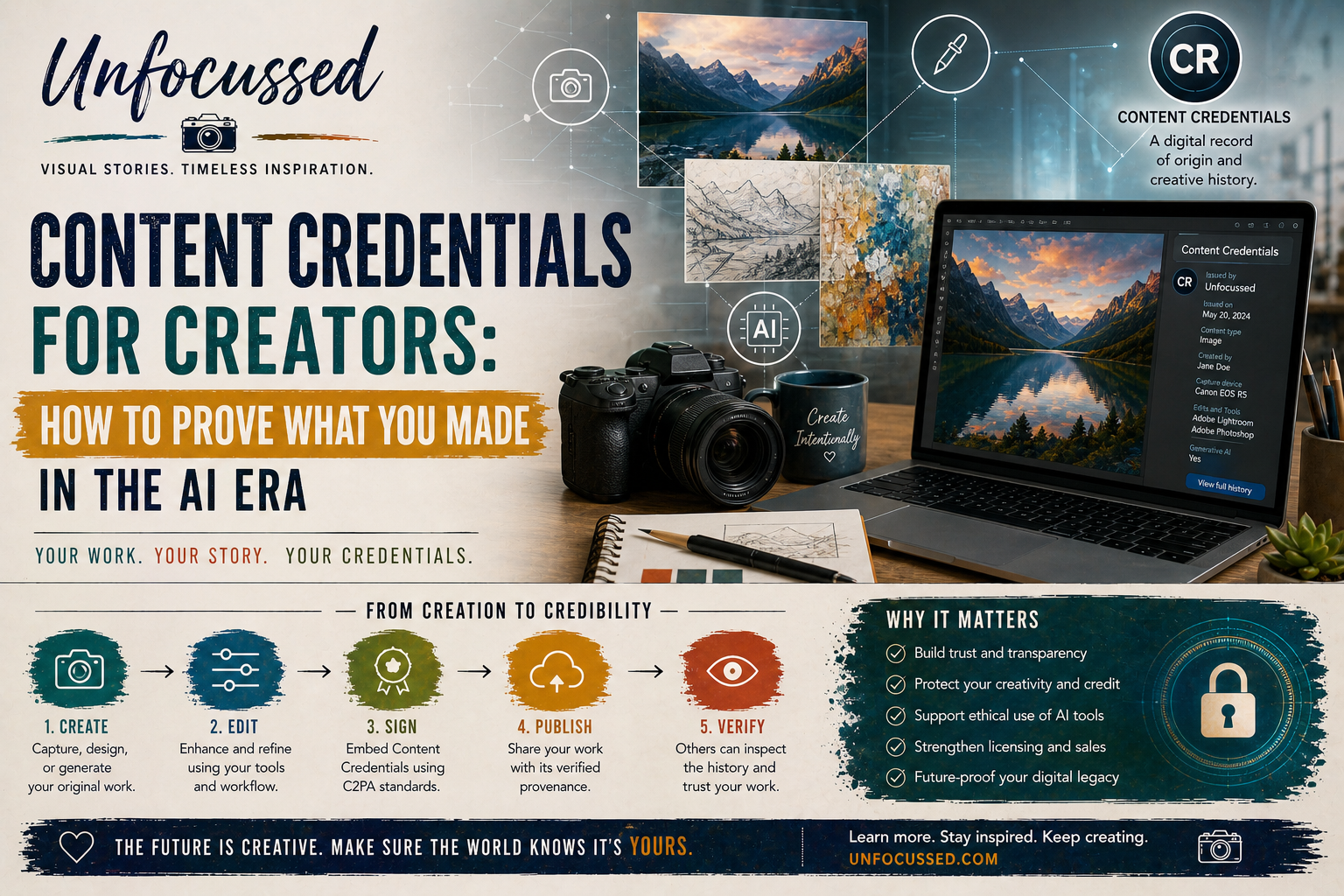
Las imágenes digitales siempre han necesitado una firma. Los pintores tenían las esquinas de los lienzos. Los fotógrafos tenían hojas de contacto, negativos, marcas de impresión, facturas y la maravillosamente glamurosa caja de cartón etiquetada como "no perder". Los creadores en línea heredaron algo mucho más desordenado: capturas de pantalla, publicaciones, cargas comprimidas, metadatos eliminados, remezclas de IA y el ocasional archivo misterioso llamado final-final-REAL-final-3.jpg.
Las credenciales de contenido son una respuesta a ese desorden. No son mágicas. No detendrán todos los robos, resolverán todas las disputas de derechos de autor ni transformarán Internet en un archivo bien iluminado donde todos se comporten. Eso requeriría un mago, un abogado y posiblemente algunos bocadillos. Lo que sí pueden hacer es dar a tu trabajo digital un registro más sólido y transparente de dónde vino, quién lo hizo, qué herramientas se utilizaron y cómo cambió en el camino.
Para fotógrafos, artistas digitales, diseñadores, creadores asistidos por IA y autores independientes, esto es importante. Tu imagen no es solo un archivo. Puede convertirse en una impresión, una portada de libro, una publicación social, un activo de licencia, un patrón, una maqueta de producto o el latido visual de una historia. Cuantos más lugares recorra, más útil será que lleve consigo un contexto confiable.

Una ruta de procedencia funciona mejor cuando se trata como parte del flujo de trabajo creativo, no como una etiqueta de última hora pegada a un archivo terminado.
¿Qué son las Credenciales de Contenido?
Las Credenciales de Contenido son una forma de metadatos seguros e inalterables adjuntos al contenido digital. Piense en ellas como una "etiqueta nutricional digital" para una imagen, un video, un archivo de audio u otro activo multimedia. En lugar de informar a los espectadores sobre calorías y carbohidratos, pueden informar a los espectadores sobre el origen creativo, el historial de edición, las herramientas utilizadas y si la IA generativa fue parte del proceso.
La base técnica detrás de las Credenciales de Contenido es la Coalition for Content Provenance and Authenticity, generalmente abreviada como C2PA. C2PA desarrolla estándares técnicos abiertos para documentar el origen y el historial de edición de los medios digitales. La experiencia pública a menudo se denomina Credenciales de Contenido: el pin visible "CR", el panel de inspección o la capa de verificación que ayuda a los espectadores a comprender qué información está adjunta a una pieza de contenido.
La forma más sencilla de entender la idea es la siguiente: los metadatos ordinarios dicen algo sobre un archivo, pero las credenciales de contenido están diseñadas para hacer que esa información sea más difícil de alterar discretamente sin ser detectada. La credencial puede firmarse criptográficamente, lo que significa que los cambios posteriores pueden ser señalados. Eso no hace que una imagen sea "verdadera" en el sentido filosófico. Hace que el historial adjunto de la imagen sea más inspeccionable y más resistente a la manipulación invisible.
Por qué los creadores deberían preocuparse
Si creas obras visuales, ya estás operando en una economía de confianza. Los compradores quieren saber qué están comprando. Los lectores quieren saber si una portada, ilustración o foto pertenece al artista que la compartió. Las marcas quieren licenciar obras sin caer en una trampa de derechos de autor. Los coleccionistas quieren tener la seguridad de que una impresión tiene una historia de origen real. Y los creadores quieren que el crédito se mantenga adjunto después de que se presione el primer botón de compartir con entusiasmo.
Las credenciales de contenido respaldan esa confianza de cuatro maneras prácticas:
- Atribución: pueden conectar tu nombre, marca, sitio web o perfil social a tu trabajo.
- Transparencia: pueden mostrar si una imagen fue capturada por una cámara, editada, generada o ensamblada a través de múltiples pasos creativos.
- Contexto de licencia: pueden ayudar a respaldar una conversación más clara sobre la propiedad, los permisos, el uso y la información de contacto.
- Documentación del proceso creativo: crean un registro más sólido de cómo se creó una obra, especialmente cuando el flujo de trabajo incluye tanto la dirección humana como las herramientas digitales.
Este último punto es importante. A medida que los flujos de trabajo asistidos por IA se vuelven normales, la pregunta valiosa ya no es "¿Se utilizó una herramienta?". Por supuesto que se utilizaron herramientas. Las cámaras son herramientas. Photoshop es una herramienta. Lightroom es una herramienta. Los sistemas generativos son herramientas. La mejor pregunta es: ¿Qué contribuyó el creador, qué contribuyó la herramienta y con qué claridad se puede explicar ese proceso?
Qué no son las Credenciales de Contenido
Antes de emocionarnos demasiado y empezar a poner pequeñas capas de procedencia en cada JPEG, seamos claros sobre los límites.
Las credenciales de contenido no son un registro de derechos de autor. Pueden respaldar la atribución y la documentación, pero no reemplazan el registro formal de derechos de autor, los acuerdos legales, las facturas, los comunicados de modelos, los comunicados de propiedad o los contratos de licencia.
Las credenciales de contenido no son gestión de derechos digitales. No impiden que alguien descargue, capture, recorte o use indebidamente una imagen. Añaden contexto y señales de verificación; no construyen un campo de fuerza alrededor de tu arte.
Las credenciales de contenido no son una máquina de la verdad. Pueden ayudar a los espectadores a inspeccionar el origen y las ediciones. No pueden probar que una escena representada en una imagen sea objetivamente precisa, éticamente presentada o libre de contexto engañoso.
Las credenciales de contenido no se conservan universalmente en todas partes. Algunas plataformas pueden mostrarlas. Algunas pueden conservarlas. Algunas pueden eliminar metadatos, comprimir archivos o no mostrar nada útil en absoluto. Por eso, los creadores necesitan un flujo de trabajo, no solo un botón.
Cómo difieren las credenciales de contenido de las marcas de agua, EXIF y los metadatos IPTC
Los creadores ya tienen varias formas de marcar o describir imágenes. Las credenciales de contenido no las reemplazan todas. Se sitúan junto a ellas como parte de una pila de procedencia mejor.
Marcas de agua visibles
Una marca de agua visible coloca un nombre, logotipo o marca directamente sobre la imagen. Puede desalentar la reutilización casual y facilitar la identificación de capturas de pantalla, pero también afecta la experiencia visual. Una marca de agua pesada puede hacer que una hermosa imagen parezca que está siendo retenida por un logotipo.
Datos EXIF
Los metadatos EXIF suelen almacenar información técnica de captura, como el modelo de cámara, el objetivo, la velocidad de obturación, la apertura, la ISO, las marcas de tiempo y, a veces, datos de ubicación. EXIF puede ser útil, pero a menudo se elimina durante las cargas, las exportaciones o el uso compartido en redes sociales. Tampoco explica todo el proceso creativo.
Metadatos IPTC
Los metadatos de fotos IPTC son especialmente valiosos para fotógrafos y editores porque admiten campos descriptivos, nombres de creadores, avisos de derechos de autor, leyendas, palabras clave, ubicaciones, información de derechos y datos de licencia. Los metadatos IPTC son uno de los mejores hábitos que un creador visual profesional puede adquirir.
Credenciales de Contenido
Las credenciales de contenido añaden una capa de procedencia firmada. Pueden mostrar información sobre la creación, edición, participación de IA e identidad de una manera diseñada para la inspección y la prueba de manipulación. En lenguaje sencillo: EXIF dice: "Aquí están los ajustes de captura". IPTC dice: "Aquí está la información descriptiva y de derechos". Una marca de agua dice: "Esto es mío, por favor, compórtate". Las credenciales de contenido dicen: "Aquí hay un registro verificable de lo que este activo dice sobre su origen y cambios".
La pila de procedencia: un sistema mejor que un solo botón mágico
Un creador individual no necesita un sistema de sala de prensa empresarial para empezar a generar confianza. El objetivo es una pila de procedencia mínima viable: un conjunto de hábitos repetibles que protegen tu trabajo, aclaran tu proceso y evitan que tu yo futuro quiera tirar un disco duro a un lago.
Aquí tienes una pila práctica para fotógrafos, artistas digitales y narradores visuales:
- Conserva el archivo fuente original. Guarda la captura original, el renderizado original, el escaneo original o el primer activo generado/capturado siempre que sea posible.
- Conserva los archivos de trabajo principales. Conserva los archivos por capas, las versiones editadas, las notas de indicaciones, las máscaras, los compuestos y la configuración de exportación para las obras principales.
- Añade metadatos descriptivos sólidos. Incluye título, creador, aviso de derechos de autor, descripción, palabras clave, sitio web, contacto de licencia y declaración de derechos.
- Documenta la participación de la IA cuando sea relevante. Conserva resúmenes de indicaciones, nombres de herramientas, notas de modelo/versión cuando estén disponibles y registros de ediciones humanas importantes.
- Aplica las credenciales de contenido durante la exportación o publicación. Utiliza herramientas compatibles para adjuntar credenciales a los activos finales o casi finales.
- Inspecciona después de la publicación. Comprueba si las credenciales sobrevivieron a la carga, compresión, manejo de la plataforma o procesamiento del tema.
- Archiva el activo terminado con su contexto. Almacena la imagen final, los archivos fuente, los metadatos, las notas de licencia, el uso del producto y los enlaces del blog/historia juntos.
Eso suena a mucho hasta que lo vuelves aburrido. Aburrido es bueno aquí. Los flujos de trabajo aburridos salvan a las empresas creativas. El caos puede ser romántico en un montaje de película, pero es un sistema de archivo terrible.

Un flujo de trabajo de procedencia práctico separa los archivos fuente, los metadatos visibles, las credenciales de contenido, las comprobaciones previas a la publicación y los registros de archivo a largo plazo.
Un flujo de trabajo amigable para el creador, desde la captura hasta la publicación
El mejor flujo de trabajo de procedencia es el que realmente puedes repetir cuando estás cansado, ocupado, con cafeína y haciendo malabarismos con diecisiete pestañas del navegador. Aquí tienes una versión realista.
Paso 1: Captura o crea pensando en el uso final
Empieza por identificar en qué podría convertirse el activo. ¿Es una impresión de bellas artes? ¿Una imagen principal de blog? ¿Un candidato a portada de libro? ¿Un diseño de producto? ¿Un activo de licencia? La respuesta afecta la forma en que conservas cuidadosamente el archivo fuente, qué metadatos añades y qué exportaciones terminadas creas.
Por ejemplo, una fotografía destinada a arte mural y licencias debería tener una ruta de archivo más limpia que un avance social rápido. Una imagen principal para una entrada de blog de formato largo debería incluir un título, descripción y planificación de texto alternativo sólidos, y texto cercano. Una imagen de producto debería incluir notas sobre la seguridad del recorte, las dimensiones de impresión y dónde aparece la imagen en la tienda.
Paso 2: Conservar la fuente
Guarde la captura original, el activo generado, el escaneo o el punto de partida compuesto. Utilice una convención de nomenclatura que conecte el archivo a una fecha, proyecto y tema. Un formato simple funciona:
AAAA-MM-DD_proyecto-tema_creador_original.ext
Ejemplo: 2026-05-04_garza-iluminada-por-la-luna_tiepelman_original.raw
El sistema de nomenclatura exacto importa menos que la consistencia. El enemigo no es la imperfección. El enemigo es una carpeta llena de nombres de archivo abandonados que murmuran "IMG_8847" como pequeños duendes.
Paso 3: Registrar las decisiones creativas
Mantén una breve nota del proceso mientras el trabajo está fresco. No necesitas una disertación. Unas pocas frases pueden ser suficientes:
- ¿Cuál fue la fuente original?
- ¿Qué ediciones importantes se hicieron?
- ¿Se utilizaron herramientas generativas?
- ¿Se compuso la imagen a partir de múltiples fuentes?
- ¿Existe una historia, un producto o un propósito de licencia asociado?
Esta nota del proceso será útil más adelante al escribir descripciones de productos, páginas de licencias, leyendas, texto alternativo e historias. También ayuda a distinguir tu dirección creativa humana de la salida de la herramienta cuando hay pasos asistidos por IA.
Paso 4: Añadir metadatos antes de la exportación final
Antes de publicar, añada metadatos descriptivos y de derechos. Dependiendo de su software, esto puede ocurrir en Lightroom, Photoshop, Bridge, Capture One, Photo Mechanic u otra herramienta de gestión de activos. Los campos útiles incluyen:
- Creador: Su nombre o el nombre de su estudio.
- Aviso de derechos de autor: Una declaración clara de derechos.
- Descripción/leyenda: Una descripción legible por humanos de la imagen.
- Palabras clave: Temas relevantes, términos de estilo, ubicación, estado de ánimo y uso del producto.
- Línea de crédito: Cómo desea que se le atribuya la obra.
- Sitio web o URL de derechos: Donde alguien puede obtener más información o solicitar una licencia.
Los metadatos no son glamorosos, pero tampoco lo es el hilo dental. Ambos previenen problemas costosos más adelante.
Paso 5: Aplicar Credenciales de Contenido
Utilice una herramienta compatible para aplicar credenciales de contenido a la exportación. La interfaz exacta variará según el software y seguirá evolucionando, así que trate esto como un principio de flujo de trabajo en lugar de un tutorial de una sola pantalla. En muchos flujos de trabajo de creadores, esto puede ocurrir a través de aplicaciones de Adobe compatibles o a través de Adobe Content Authenticity.
Decida qué información desea incluir. La identidad del creador puede ser útil, pero la privacidad sigue siendo importante. Si un archivo incluye datos de ubicación, información personal, detalles de clientes privados o contexto sensible, no publique todo ciegamente. La procedencia debe respaldar la confianza sin convertir su vida en una venta de garaje de metadatos.
Paso 6: Publicar y luego verificar
Después de subir la imagen a un blog, portfolio, tienda o plataforma, inspecciónala. Utiliza las herramientas de inspección disponibles, las extensiones del navegador o los indicadores de la plataforma para confirmar si la credencial es visible o recuperable. Si desaparece, anótalo. Eso no significa que todo el flujo de trabajo haya fallado. Significa que esa ruta de publicación en particular aún no puede preservar o mostrar las credenciales de manera confiable.
Para un blog o página de producto de Shopify, el hábito práctico es simple: conserva el original acreditado en tu archivo, publica una versión optimizada para la web y mantén la copia de tu página pública alineada con el registro de procedencia. El texto del artículo, la leyenda, el texto alternativo, el nombre del archivo y la descripción del producto no deberían contar cinco historias diferentes sobre la misma imagen.
Lo que los espectadores pueden ver al inspeccionar las credenciales
Cuando se muestran las credenciales de contenido, los espectadores pueden ver información como el creador o firmante, el método de creación, las herramientas de edición, el uso de IA, la fecha de emisión y otros detalles de procedencia relacionados. El panel exacto depende del archivo, la herramienta utilizada, la información incluida y la plataforma que lo muestra.
Aquí es donde las Credenciales de Contenido se vuelven útiles para las marcas narrativas. Un espectador no solo ve una "imagen bonita". Puede ver una cadena creativa: capturada, editada, firmada, publicada y conectada a un artista o estudio. Eso convierte un archivo en un artefacto más confiable.

Un panel de credenciales visible para el espectador debe facilitar la inspección de la autoría, las herramientas, las ediciones, la divulgación de IA, los enlaces de origen y el estado de verificación.
Uso de Credenciales de Contenido con trabajo asistido por IA
El arte asistido por IA necesita más transparencia, no más pánico. El objetivo no es disculparse por cada herramienta de tu estudio. El objetivo es describir el papel de esas herramientas con la suficiente honestidad para que compradores, lectores, editores y colaboradores puedan tomar decisiones informadas.
Si se utilizó IA generativa como parte del flujo de trabajo, documéntala en lenguaje sencillo. Las notas útiles podrían incluir:
- La herramienta o plataforma utilizada.
- El papel general del paso de IA: exploración de conceptos, extensión de fondos, generación de texturas, ayuda de composición, limpieza o generación de imágenes completas.
- El trabajo creativo humano añadido después: selección, edición, pintura, composición, retoque, gradación de color, tipografía o desarrollo narrativo.
- Si el trabajo final incluye fotografía original, activos con licencia, material de dominio público o elementos generados.
Esto no significa convertir cada publicación de blog en un informe de laboratorio. Significa mantener suficientes detalles del proceso para ser creíble. Para trabajos comerciales, portadas, licencias y productos, esa credibilidad es valiosa.
Algunas herramientas también permiten a los creadores señalar las preferencias de uso y entrenamiento de IA generativa. Trate esas configuraciones como una solicitud y una señal de confianza, no como un escudo legal universal. Son útiles, pero no son un sustituto de los términos de la plataforma, los contratos, la estrategia de derechos de autor o el sentido común con zapatos sensatos.
Privacidad: Qué no adjuntar
Más transparencia no siempre es mejor. Una buena procedencia es una procedencia selectiva. Antes de adjuntar o publicar metadatos, pregúntese si alguno de los siguientes elementos debe eliminarse, generalizarse o mantenerse en privado:
- Coordenadas GPS exactas de un hogar, estudio, propiedad privada, hábitat en peligro de extinción o ubicación sensible.
- Nombres de clientes o información de proyectos no publicados.
- Detalles privados de modelos, asistentes o colaboradores.
- Información de contacto personal que no debería ser pública.
- Nombres de archivo internos que revelan planes de productos no publicados o notas privadas.
Un flujo de trabajo sólido para creadores equilibra la prueba con la discreción. Quieres suficientes detalles para generar confianza. No necesitas publicar el equivalente digital de las llaves de tu casa.
Cómo las credenciales de contenido respaldan las licencias
La concesión de licencias depende de la claridad. Un comprador o editor quiere saber quién es el propietario de la obra, qué derechos están disponibles, de dónde procede la imagen y si hay algo en el archivo que genere riesgo. Las credenciales de contenido pueden respaldar esa conversación al mantener la autoría y la información del proceso más cerca del activo.
Para una imagen lista para licenciar, combine las Credenciales de Contenido con un paquete de derechos limpio:
- Un creador o estudio con nombre.
- Un aviso de derechos de autor.
- Una URL de derechos o licencia.
- Una breve descripción de la obra.
Este último punto a menudo se pasa por alto. Si una imagen aparece como una impresión limitada, una portada de libro, un héroe de blog, una pegatina y un recurso editorial con licencia, debe hacer un seguimiento de esos usos. De lo contrario, podría vender accidentalmente derechos contradictorios o confundir a un comprador. Cuanto más comercial se vuelve su archivo, más se convierte la procedencia en infraestructura empresarial.
Una lista de verificación de procedencia mínima viable
Utilice esta lista de verificación para cualquier imagen que espere publicar, vender, licenciar o reutilizar en múltiples formatos:
- Nombre el activo claramente. Utilice un nombre de archivo coherente con la fecha, el proyecto, el tema y la versión.
- Guarde la fuente. Conserve los archivos RAW, las capturas originales, los escaneos, los puntos de partida generados o los primeros compuestos.
- Guarde las ediciones principales. Mantenga los archivos de trabajo en capas o editables para piezas importantes.
- Escriba una nota de proceso. Registre la captura, edición, composición, asistencia de IA e intención creativa.
- Agregue metadatos estilo IPTC. Incluya el creador, los derechos de autor, el pie de foto, las palabras clave, el sitio web y la información de derechos/contacto.
- Aplique credenciales de contenido. Adjunte credenciales a través de una herramienta compatible al preparar el activo final.
- Exporte intencionadamente. Cree versiones separadas para archivo, web, maquetas de productos, impresión y uso social.
- Verifique después de la carga. Compruebe si la credencial es visible, se conserva o es inspeccionable después de la publicación.
- Registre el uso público. Realice un seguimiento de las publicaciones de blog, productos, licencias, portadas, anuncios y campañas sociales que utilizan la imagen.
- Revise periódicamente. Actualice los metadatos, las notas de licencia y los registros de archivo a medida que la imagen obtiene nuevos usos.

La procedencia mínima viable significa documentar quién hizo el trabajo, qué cambió, cuándo sucedió, dónde se publicó y cómo se puede verificar la historia.
Dónde encaja esto en un negocio creativo
Para un creador visual, la procedencia no solo se trata de defenderse contra el uso indebido. Se trata de construir un ecosistema creativo más fuerte. Una imagen bien documentada puede convertirse en una ilustración de blog, una impresión, una portada con licencia, un aviso de historia, un diseño de producto o parte de una colección más grande sin perder su rastro de origen.
Esto es especialmente importante para la narración visual. Cuando el arte se combina con ficción, ensayos, descripciones de productos o listados de tiendas, la imagen adquiere significado con el tiempo. Se convierte en parte de un universo narrativo. Las credenciales de contenido ayudan a preservar la capa fáctica debajo de esa capa creativa: quién lo hizo, cómo se movió a través del flujo de trabajo y qué información viaja con él.
Esa capa fáctica no hace que el arte sea menos mágico. Hace que la magia sea más fácil de confiar.
Errores comunes a evitar
Error 1: Esperar hasta que el archivo ya sea un desastre
No espere hasta tener diez años de imágenes y un disco duro embrujado. Empiece poco a poco. Elija sus próximas veinte imágenes publicables y construya el flujo de trabajo allí.
Error 2: Tratar las credenciales de contenido como un reemplazo de los metadatos
Utilice las credenciales de contenido con buenos metadatos descriptivos y de derechos. El contenido visible de su página, el texto alternativo, los subtítulos, los nombres de archivo y los metadatos deben reforzarse entre sí.
Error 3: Publicar metadatos sensibles
Verifique los detalles de ubicación, cliente e identidad antes de adjuntar o publicar credenciales. La confianza no requiere compartir en exceso.
Error 4: Nunca verificar después de la carga
Una exportación acreditada no es el final del flujo de trabajo. Las cargas, la compresión y el manejo de la plataforma pueden cambiar lo que sobrevive. Siempre inspeccione los activos importantes después de la publicación.
Error 5: Ocultar el uso de IA cuando es material
Si la IA moldeó significativamente el trabajo final, documéntelo. La claridad es mejor que el silencio incómodo. El silencio incómodo es donde la confianza se tropieza con una silla.
Pensamiento final: la procedencia es parte de la historia
El trabajo creativo siempre ha tenido una historia. El boceto antes de la pintura. El negativo antes de la impresión. El borrador antes de la novela. La hoja de contacto antes de la exposición. Los medios digitales no eliminaron esa historia; simplemente la hicieron más fácil de perder.
Las credenciales de contenido brindan a los creadores una forma de mantener más de esa historia adjunta, inspeccionable y útil. No son perfectas y aún no son universales. Pero son un paso práctico hacia una web creativa más saludable: una donde la atribución es más fácil de preservar, el proceso es más fácil de explicar y los espectadores pueden tomar mejores decisiones sobre lo que están viendo.
Para los artistas y fotógrafos que construyen un cuerpo de trabajo, el mejor momento para preocuparse por la procedencia es antes de que la imagen se extienda por todas partes. El segundo mejor momento es ahora. Comience con la siguiente pieza. Guarde la fuente. Agregue los metadatos. Adjunte la credencial. Verifique la carga. Mantenga el registro.
Su futuro archivo se lo agradecerá. En silencio, porque los archivos son introvertidos.
 Arte Asistido por IA y Derechos de Autor: Qué Pueden Reclamar Realmente los Creadores
 La ciencia de la jerarquía visual en el diseño gráfico
 Cómo usar contrastes de color para causar impacto